> ## Documentation Index
> Fetch the complete documentation index at: https://docs.getkadabra.com/llms.txt
> Use this file to discover all available pages before exploring further.
# Getting Started
> A fast, friendly intro to Kadabra that gets you building in minutes
# Welcome to Kadabra
Kadabra is your AI assistant for automation. Describe what you want in plain English and Kadabra helps you plan, build, and run it.
*No code,\
Plain English,\
Visual Canvas.*\
Build automations faster by combining AI reasoning with clear, visual steps.
***
## Meet the Canvas
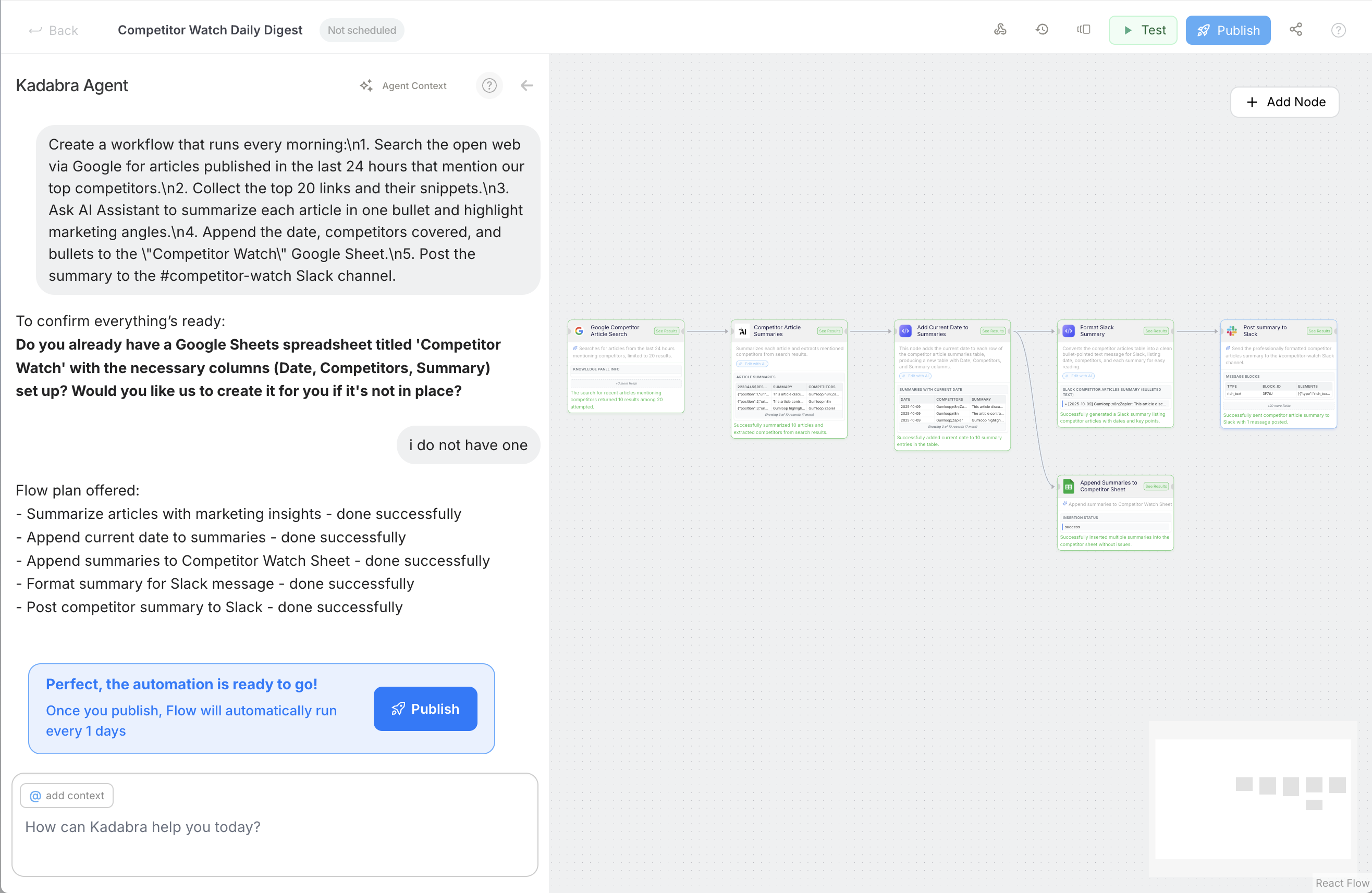
The **Canvas** is your visual workspace. You design logic by connecting blocks and you can ask the Agent to set things up for you.
Nodes are the steps. Lines show how data moves. That is the whole mental model.
See inputs and outputs at every step so you can debug fast.
 ***
## Say hi to Kadabra Agent
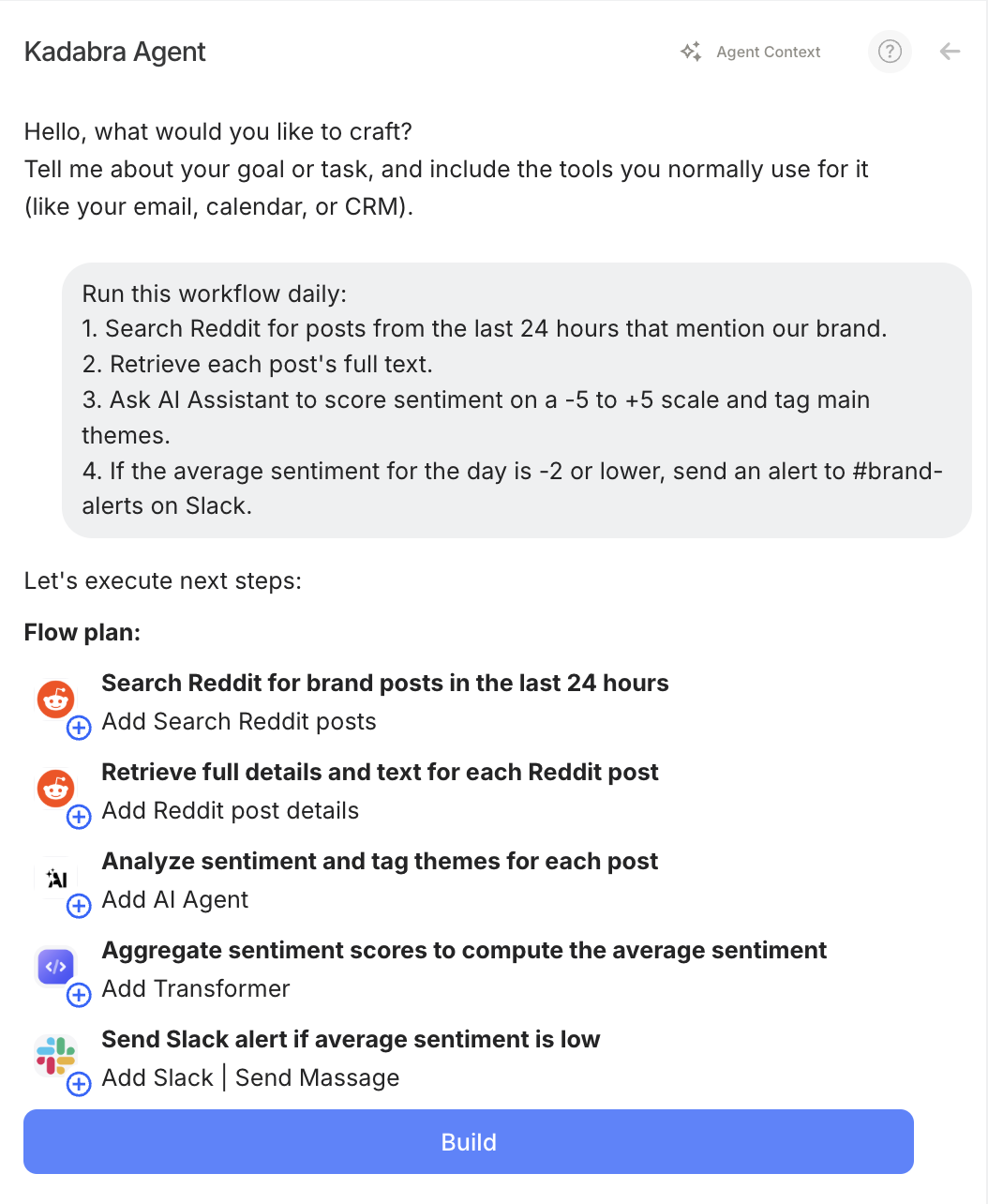
The **Kadabra Agent** understands what you want to build, checks prerequisites, proposes a plan, and can place nodes on the Canvas for you.
Describe your goal. The Agent turns it into a build plan.
If you need a sheet, a form, or a credential, the Agent tells you first.
Places and connects nodes so you start from a working draft, not a blank page.
Try: **Create a daily Slack summary from new support tickets.**
***
## Say hi to Kadabra Agent
The **Kadabra Agent** understands what you want to build, checks prerequisites, proposes a plan, and can place nodes on the Canvas for you.
Describe your goal. The Agent turns it into a build plan.
If you need a sheet, a form, or a credential, the Agent tells you first.
Places and connects nodes so you start from a working draft, not a blank page.
Try: **Create a daily Slack summary from new support tickets.**
 ***
## What can you build
Digest new tickets, issues, or mentions and post one clean summary.
New row in Sheets - AI summary - post to Slack or update a CRM.
Mirror new Notion records into a Sheet for analysis.
Turn links in a sheet into ready to post captions.
and wayyyyyy many more...
***
## Your first win in 3 steps
Example: **When a row is added in Google Sheets, summarize it and post to Slack.**
The Agent proposes nodes, adds the trigger, and wires Slack.
Run once, check previews, then publish so it runs automatically.
Flows save automatically. You can share them with teammates or clone them as templates.
## Where to go next?
A focused guide to creating an Agent that plans and edits on the Canvas.
Learn the deeper mental model: Flows, Agentic vs Deterministic, Canvas, Interface, Triggers, Credits.
Step by step tutorials like Set a Trigger, Connect Apps, Build a Workflow, Publish, Use Interface.
Get a short answers to common questions about usage, billing, limits and general ops.
***
## What can you build
Digest new tickets, issues, or mentions and post one clean summary.
New row in Sheets - AI summary - post to Slack or update a CRM.
Mirror new Notion records into a Sheet for analysis.
Turn links in a sheet into ready to post captions.
and wayyyyyy many more...
***
## Your first win in 3 steps
Example: **When a row is added in Google Sheets, summarize it and post to Slack.**
The Agent proposes nodes, adds the trigger, and wires Slack.
Run once, check previews, then publish so it runs automatically.
Flows save automatically. You can share them with teammates or clone them as templates.
## Where to go next?
A focused guide to creating an Agent that plans and edits on the Canvas.
Learn the deeper mental model: Flows, Agentic vs Deterministic, Canvas, Interface, Triggers, Credits.
Step by step tutorials like Set a Trigger, Connect Apps, Build a Workflow, Publish, Use Interface.
Get a short answers to common questions about usage, billing, limits and general ops.